The Blue Elegant Company Profile Template: Your Foundation for Professional Design
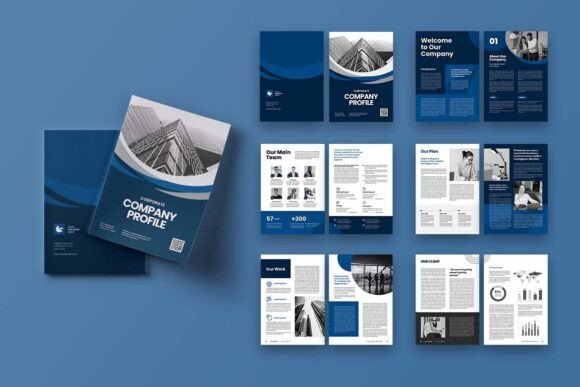
In today’s visually-driven market, a company profile is more than just a document; it’s a statement of your brand’s credibility and style. For many entrepreneurs, marketers, and creatives, the challenge isn’t having the right information, but presenting it in a polished, compelling format. This is where a dedicated template like Blue Elegant Company Profile becomes invaluable. It’s a professional A4-size layout template for Adobe InDesign, crafted specifically to blend images, infographics, and text in a stylish, cohesive manner. Understanding what it truly offers—and how to avoid common pitfalls when using it—can transform it from a simple download into a powerful tool for all your project objectives.
What It Is and Why It Appeals
The Blue Elegant Company Profile is a complete 12-page InDesign template, including front and back covers, designed for the standard A4 dimension of 29.7cm x 21cm. It promises elegance, ease of use, and full customization within Adobe InDesign. Features like neatly organized layers, smart objects, CMYK color format, and 300 DPI resolution are aimed at producing a print-ready, high-quality document. Its appeal is broad: a beginner can achieve a professional look without deep design skills, while a professional can save hours of layout work, focusing instead on content and branding. However, the initial excitement of finding such a template often leads to overlooked details that can undermine the final result.
Common Missteps and How They Impact Your Project
One of the most frequent misunderstandings revolves around the included assets. The template description clearly notes that all images are just used for preview purposes only and are NOT included in the download files. Many users, especially those new to template purchasing, mistakenly assume the beautiful preview images are part of the package. They download the template, open it in InDesign, and face a layout populated with placeholder frames or low-resolution preview images. This can lead to frustration, a disjointed workflow, and a last-minute scramble to source or create suitable photography, potentially compromising the visual harmony the template is designed to provide.
Another area where people stumble is with the technical specifications. The template requires Adobe InDesign; it is not a standalone PDF or Word document. Some buyers, attracted by the elegant preview, might not have access to or familiarity with InDesign. Attempting to edit the IDML or INDD files in another application is impossible, rendering the template useless. Furthermore, while it uses free fonts from DaFont or Google Fonts, failing to install those specific fonts before opening the file can break the typography layout, causing text to default to other fonts and destroying the intended elegant aesthetic.
Technical Oversights That Affect Quality
The template is set up for professional print: CMYK color, 300 DPI, and a 3mm bleed. A common mistake is using the template for digital-only purposes without adjusting these settings. For instance, using CMYK colors for a PDF meant for web viewing can result in muted, inaccurate colors on screens, which typically use RGB. Conversely, if you intend to print but ignore the bleed area, you risk having unprinted edges or needing to trim the document manually, leading to an amateurish final product. Not understanding these foundational print terms—bleed, DPI, CMYK—before you start can mean your elegant profile looks flawed in its final medium.
A Practical Guide to Avoiding These Errors
The key to successfully leveraging the Blue Elegant Company Profile template is a methodical, preparatory approach. Before you even download the file, conduct a simple audit.
First, confirm your software and skill set. Do you have a current version of Adobe InDesign installed and a basic understanding of how to use layers and text frames? If not, consider learning the fundamentals through a quick online tutorial first. This small upfront investment prevents hours of confusion later.
Second, source your visual assets beforehand. Since the template images are only previews, gather your own high-quality company photos, logos, and infographic data. Ensure these assets are at least 300 DPI resolution if printing is your goal. Having this library ready means you can plug them directly into the template’s smart layers, maintaining a smooth workflow.
Third, download and install the required fonts. The template listing should specify the fonts used. Locate these free fonts on DaFont or Google Fonts, install them on your computer, and then open the InDesign file. This ensures all text boxes appear exactly as designed, preserving the template’s sophisticated typographic rhythm.
Adapting the Template to Your True Need
Remember that “suitable for all project objectives” means the structure is flexible, but you must adapt its technical setup. If your profile will be viewed solely online, change the color mode to RGB and consider adjusting resolution for faster loading. If you are printing, respect the bleed guides and double-check that all your placed images are in CMYK mode and at 300 DPI. This proactive customization step turns a generic template into a purpose-built document.
Evaluating the Template Before Commitment
What should you check before deciding the Blue Elegant Company Profile is right for you? Look beyond the elegant preview. Examine the feature list for compatibility: INDD and IDML files work with various InDesign versions, but verify which one you use. Understand the layer organization—a template with “neatly organized layers” is far easier to customize than one with flattened, messy elements. Consider your content volume; a 12-page template is ideal for a detailed profile, but if you only need a 4-page brochure, you’ll be editing down extensively. Assess whether the layout’s elegance aligns with your specific brand voice. A minimalist, blue-themed elegant design might not suit a vibrant, youthful brand without significant color and font overrides.
Finally, approach the template with a mindset of structured creativity. It provides the framework and the rules of good design—balance, spacing, hierarchy. Your job is to infuse it with your unique content and brand essence. By avoiding the common mistakes of asset assumption, software mismatch, and technical neglect, you harness the true power of the Blue Elegant Company Profile. It becomes not just a shortcut to a beautiful document, but a learning tool that elevates your own design understanding and ensures your company’s story is presented with the professionalism it deserves.